



As businesses move into 2026, digital transformation is no longer optional. Mid-size and large enterprises are under increasing pressure to improve processes, unify teams across departments, strengthen customer relationships, and maintain accurate operational visibility. With this shift, two platforms consistently appear on evaluation lists: Odoo and monday.com.
Both platforms offer CRM capabilities, workflow management, and integration potential. However, their foundations are very different. Odoo is a modular ERP + CRM ecosystem, while monday.com is a work-management and CRM platform designed for collaboration, project execution, and pipeline visibility.
What is Odoo?
Odoo is an open-source ERP and CRM suite offering over 60+ business applications that cover sales, inventory, accounting, human resources, project management, eCommerce, manufacturing, purchasing, and more.
It is designed for companies that need end-to-end business management, not just CRM capabilities. Its modular architecture allows businesses to start with a single application and expand into a full ERP ecosystem as their operations grow.
According to a 2025 comparison by Appvizer, Odoo stands out because it consolidates distributed processes into one unified, customizable system, reducing operational fragmentation
Features of Odoo CRM:
1. Comprehensive CRM and Sales Management
Odoo’s CRM module provides advanced lead scoring, automated sales workflows, multi-stage pipelines, forecasting, and real-time reporting. Unlike lightweight CRMs, its pipelines directly integrate with email, invoicing, product catalogs, and helpdesk operations. This gives sales teams full visibility from initial outreach to post-purchase service without switching systems.
2. Fully Integrated ERP Modules
Odoo’s biggest value lies in its ERP capabilities. Businesses can manage accounting, procurement, warehouse operations, manufacturing, project management, marketing, HR, and POS from a centralized system. The modules share real-time data, eliminating duplication, human error, and interdepartmental miscommunication.
3. Extensive Customization & Open-Source Flexibility
Being open-source, Odoo allows companies to completely customize workflows, automate complex business logic, redesign UI components, and integrate external systems. Enterprises with unique business processes such as, multi-warehouse operations or engineered-to-order production gain flexibility that SaaS-only tools cannot match.
4. Strong Manufacturing and Inventory Capabilities
Odoo offers advanced inventory routing, barcode scanning, batch/serial tracking, production orders, work-centers, and manufacturing planning. This makes it suitable for industrial operations and multi-warehouse organizations where ERP-level oversight is mandatory.
5. Effortless Integrations Across the Suite
Odoo natively integrates CRM, inventory, accounting, and project management, meaning departments don’t rely on external tools that may cause data silos. Real-time sync across modules ensures that sales pipelines, stock levels, invoicing, and delivery timelines remain aligned automatically.
>> Related Post: Best Odoo CRM Consulting & Implementation Partner in 2026
Pros and Cons of Odoo
Pros
1. All-in-One Platform for CRM + ERP
Odoo allows businesses to run all major functions under one umbrella. This reduces reliance on multiple SaaS subscriptions and centralizes data for greater accuracy and operational speed. Large organizations benefit from unified reporting, interdepartmental transparency, and reduced integration failure points.
2. High Customizability
The open-source nature of Odoo enables enterprises to adjust processes around their operational realities. Whether it’s custom approval chains, advanced automation, or customized manufacturing workflows, Odoo adapts to business needs rather than the other way around. This makes it ideal for companies in niche industries or those with complex internal systems.
3. Scalability for Large or Multi-Branch Businesses
Enterprises can expand from CRM-only setups to full ERP implementations as operations grow. Multiple warehouses, international branches, multi-currency accounting, and large user bases are all supported without compromising performance, making it a long-term solution.
4. Cost Efficiency Through Modular Selection
Businesses only pay for the applications they need. This allows controlled scaling without the financial burden of an enterprise-wide tool that includes unnecessary functionalities.
Cons
1. Steep Learning Curve
With its vast capabilities, Odoo requires training and expert setup. Enterprises often need specialized partners or certified consultants to configure modules, which increases initial implementation time.
2. Higher Implementation Effort
While the software may be affordable, implementation, including customization, deployment, and integrations, can become resource-heavy, especially for large-scale ERP rollouts.
3. Support Limitations
Odoo’s direct support can feel slow or restricted for enterprise customers. Businesses often depend on third-party partners for deeper support or troubleshooting.
>> Related Post: Odoo Pricing: Implementation Cost and Pricing Details [2026]
Pricing of Odoo CRM in 2026
According to SoftwareAdvice’s 2025 pricing comparison, Odoo CRM’s paid plan begins at $38.90 per user/month.
Key considerations:
- The free CRM version provides basic lead and pipeline management.
- Additional modules (inventory, HR, accounting, MRP) cost extra.
- Self-hosting may reduce subscription costs but requires servers, IT staff, and maintenance.
>> Related Post: Odoo vs Zoho: Which One is Better in 2026?
What is monday.com?
monday.com is a cloud-based Work OS designed for collaboration, project workflows, sales pipelines, HR processes, and team communication. Its CRM offering has expanded rapidly in 2025–26, making it a strong competitor for sales-focused organizations and service-based businesses.
Unlike Odoo, monday.com is not an ERP platform. Instead, it focuses on:
- Task and project management
- Sales pipelines and CRM
- Automation
- KPI dashboards
- Team collaboration
Features of monday.com
1. Intuitive Visual Workflows & Boards
monday.com allows teams to manage tasks, projects, and processes through customizable visual boards, including Kanban, calendar, timeline, workload, and Gantt views. These boards help teams understand project progress at a glance and reduce time spent navigating complex systems.
2. Collaborative CRM for Sales Teams
monday.com CRM enables teams to track leads, deals, pipelines, and follow-ups with color-coded statuses, email tracking, and customizable stages. Its strength lies in transparency: managers can see exactly where each deal stands and which team member is responsible.
3. Automations for Repetitive Work
Automations help eliminate manual updates, such as notifying team members, moving deals to new stages, generating reminders, or updating statuses. This is especially useful for service-based teams that handle multiple clients and rapid task cycles.
4. Strong Integration Ecosystem
monday.com integrates with tools like Slack, Gmail, Teams, Google Drive, HubSpot, Zendesk, Mailchimp, and more. This makes it ideal for businesses relying on multiple SaaS systems for everyday operations.
5. Real-Time Collaboration & Visibility
Teams can comment, tag members, upload files, and share updates within every board item. This reduces scattered communication and keeps conversation tied directly to tasks, campaigns, or deals.
>> Related Post: Best monday.com CRM Consulting & Implementation Partner in 2026
Pros and Cons of monday.com
Pros
1. Extremely Easy to Use
The platform’s drag-and-drop UI, templates, and pre-built dashboards help teams adopt it without dedicated IT support. This makes monday.com an attractive option for organizations looking for fast deployment.
2. Excellent for Project-Based and Service Teams
Marketing agencies, creative studios, IT service firms, HR departments, and customer onboarding teams benefit from monday.com's transparency and project visibility features.
3. Strong Collaboration and Automation
In-app communication, file sharing, automated workflows, deadline tracking, and status updates allow teams to operate efficiently with fewer meetings and less manual reporting.
4. Fast SaaS Deployment
Being fully cloud-based, monday.com requires no installation, servers, or technical expertise.
Cons
1. Not Suitable for ERP-Level Operations
Unlike Odoo, monday.com does not support inventory management, manufacturing, procurement, or accounting. Companies needing deep operational systems will need multiple external tools.
2. Costs Increase Rapidly with Team Size
Because it charges per user, large teams may see costs escalate quickly, especially when using advanced automation or dashboard features.
3. Limited Customization Compared to Open-Source Platforms
While workflows are configurable, monday.com cannot customize core logic or build deep system-level modifications like Odoo can.
>> Related Post: Monday vs Zoho: Which One is Better in 2026?
Pricing of monday.com in 2026
According to monday.com’s 2025 comparison page, pricing starts at $12 per user/month for basic CRM needs.
Higher plans offer:
- Advanced automations
- More integrations
- Enhanced dashboards
- Unlimited pipelines
>> Related Post: monday.com Pricing: Implementation Cost and Pricing Details [2026]
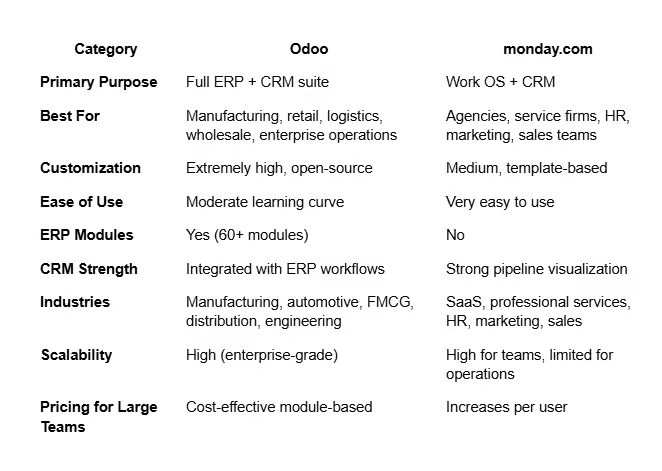
Odoo vs Monday: Which One Is Better in 2026?
>> Explore more here: Odoo ERP Solutions
How WhizzBridge Can Help You Choose Between Odoo and monday.com
Choosing between Odoo and monday.com is not a software problem. It's a business architecture decision. WhizzBridge helps enterprises by:
- Conducting business process audits to determine exact operational needs
- Mapping departmental workflows and identifying gaps
- Recommending the platform (Odoo or monday.com) that aligns with long-term scalability
- Handling implementation, customization, data migration, and onboarding
- Providing ongoing optimization and support
>> Discover more here: monday.com Professional Services
FAQs
1. Is Odoo CRM free?
Yes. Odoo offers a free CRM plan
2. Is monday.com better for small or mid-sized businesses?
Yes, especially for service-based and project-driven teams.
3. Does Odoo support manufacturing?
Yes, Odoo is one of the few open-source ERPs with full MRP support.
4. Which platform is easier to learn?
monday.com, due to its visual UI.
5. Which is better for enterprises?
Odoo, because it covers CRM + ERP in one system.
6. Does monday.com replace an ERP?
No, it is not built for inventory, accounting, or manufacturing.
7. Which has better customization?
Odoo offers deeper customization since it is open-source.
8. Is monday.com good for sales teams?
Yes, its CRM is visual, collaborative, and easy to use.
9. Which platform scales better operationally?
Odoo, especially for multi-warehouse or multi-branch operations.
10. Can WhizzBridge implement both?
Yes. WhizzBridge specializes in both Odoo and monday.com implementations.
.svg)


.svg)
Subscribe To Our Newsletter
Be the first to know about our newest projects, special offers, and upcoming events. Let’s build the future together!



.jpg)
.jpg)