


In 2026, businesses across the globe, including mid-size and large enterprises, face increasing pressure to better their operations, unify systems, and gain real-time visibility over sales, finance, inventory, and customer relationships. As spreadsheets, manual workflows, and disconnected tools become unsustainable, many organizations are evaluating ERP and CRM platforms to centralize operations. Among the most prominent options are Odoo and Zoho.
In this in-depth comparison, we will explore what each platform offers, their strengths and limitations, pricing, and the ideal scenarios in which they fit. Whether your company is in manufacturing, retail, services, or distribution, this guide aims to help you choose with clarity.
What is Odoo?
Odoo is a comprehensive, open-source business management suite that combines ERP, CRM, inventory, accounting, manufacturing, e-commerce, and more, under a modular architecture.
Originally launched as OpenERP (previously TinyERP), Odoo has evolved into a full-fledged enterprise software platform with two main versions: a free Community edition under open-source license, and a proprietary Enterprise edition with additional features and official support.
Thanks to its modular approach, Odoo allows businesses to pick and choose only the apps they need, such as CRM, Inventory, Manufacturing, Accounting, HR, e-commerce, and integrate them into a unified system. This architecture makes Odoo an appealing choice for companies that require end-to-end process automation, deep customization, and enterprise-grade scalability.
Features of Odoo
Odoo’s feature set spans across multiple business functions. Key features include:
- CRM (Customer Relationship Management): Lead and opportunity management, pipeline tracking, automated lead assignments, customizable sales workflows, reporting dashboards.
- Sales & Invoicing: Quotation and order management, invoicing, automated billing.
- Inventory & Warehouse Management: Inventory tracking, stock movements, warehouse operations, multi-warehouses support, ideal for retail, distribution, and manufacturing.
- Manufacturing & Production: BOM (Bill of Materials), manufacturing workflows, production scheduling, making it suitable for companies with complex product workflows.
- Accounting & Finance: Double-entry accounting, multi-company support, financial reports, analytics - built natively to integrate with inventory, manufacturing, sales, and other modules.
- Projects & Services: Project management, task tracking, service management.
- E-commerce / POS: For retail and online sales businesses, Odoo supports e-commerce, point-of-sale, website building, and shop management, all tied into inventory and accounting.
- Modular & Customizable Architecture: Businesses can enable only needed modules, and even extend functionality via the large community and third-party modules.
>> Related Post: Odoo vs Monday: Which One is Better in 2026?
Pros and Cons of Odoo CRM
Pros
- Deep Integration & Unified Data: As part of a full ERP ecosystem, Odoo CRM integrates easily with inventory, sales, accounting, manufacturing, and more, ensuring a single source of truth across departments.
- Highly Customizable: Being open-source and modular, Odoo allows deep customization ideal for businesses with unique processes or industry-specific needs.
- Scalability for Mid-size to Large Enterprises: Because you can add modules as you grow (inventory, manufacturing, accounting, warehouse), Odoo scales beyond simple CRM to full ERP, serving complex, multi-department operations.
- Cost-Effectiveness: The community edition is free, and even the Enterprise edition is relatively affordable compared to many full ERP suites, especially when factoring long-term growth.
- Industry Versatility: Odoo supports a wide variety of business types including manufacturing, retail, e-commerce, and distribution services making it a versatile choice across sectors.
Cons
- Complexity & Learning Curve: Because of its breadth and flexibility, Odoo can be more complex to implement and operate. New users may need training or consultancy to properly configure modules.
- Need for Implementation & Maintenance Effort: Highly customized installations often require developers or certified consultants, which increases the total cost of ownership (TCO) beyond just license fees.
- Upgrades & Support Challenges: Custom modules and customizations may need rework when updating versions. Without careful planning, updates may break functionality.
- Resource Requirement: Since Odoo can be deployed on-premise or self-hosted, businesses may need to manage infrastructure, backups, security, which may not be ideal for teams lacking technical capacity.
>> Related Post: Best Odoo CRM Consulting & Implementation Partner in 2026
Pricing of Odoo CRM
One of the major strengths of Odoo is its flexible pricing model. Using just one app (for example, CRM) may be free even for multiple users.
For a fuller, enterprise-grade experience (Enterprise Edition), Odoo charges per user per month. A ‘Standard’ plan is about US $31.10/month per user, and a ‘Custom’ plan around US $36.80/month per user, which grants access to all apps/modules (Sales, Marketing, CRM, Inventory, Accounting, etc.) in a single subscription. This modular, per-user pricing makes Odoo cost-effective especially for growing mid-size companies and enterprises that anticipate scaling across departments.
>> Related Post: Odoo Pricing: Implementation Cost and Pricing Details [2026]
What is Zoho?
Zoho is a cloud-based suite of business applications offering CRM as a core component, along with other integrated services (accounting, marketing, help-desk, email, etc.). Its flagship CRM product manages customer interactions, sales pipelines, marketing, support, and analytics.
Zoho CRM is provided as SaaS (Software as a Service), meaning all infrastructure, hosting, updates, and support are handled by Zoho, making deployment simpler and faster. Zoho aims to be an all-in-one solution especially suited for small to medium businesses (SMBs) or teams that want quick setup, accessible pricing, and minimal technical overhead.
Features of Zoho
Some key features of Zoho include:
- CRM (Sales & Lead Management): Lead and contact management, deal tracking, pipeline management, customizable sales stages, contact segmentation.
- Sales Automation & Workflow Management: Automation of repetitive tasks, sales signals, notifications, workflows. This helps sales teams to operate efficiently.
- Marketing & Customer Engagement: Integration with marketing tools, email campaigns, customer communication, omnichannel engagement when using broader Zoho suite.
- Customer Support / Service Module: Ticketing, help-desk functionalities (when organizations leverage other Zoho apps), enabling service management alongside CRM.
- Cloud-based, SaaS Model: No infrastructure to manage; hosting, maintenance, backups are handled by Zoho.
- Ease of Use & Quick Adoption: User-friendly interface, simpler configuration, less technical complexity, enabling faster onboarding for teams without heavy IT resources.
- Integration within Zoho Ecosystem: CRM integrates with other Zoho applications (books, inventory, marketing, support), offering a one-stop SaaS ecosystem for many business functions.
>> Related Post: Best Zoho CRM Consulting & Implementation Partner in 2026
Pros and Cons of Zoho
Pros
- Simplicity & Ease of Use: Zoho CRM’s intuitive interface and cloud-based model make it easy for teams to adopt quickly, even without technical expertise.
- Quick Deployment (SaaS): Since Zoho is fully hosted, there’s minimal setup. No need for servers, infrastructure, or in-house maintenance.
- Lower Entry Barrier: For small to mid-sized teams or SMBs, Zoho offers predictable subscription-based pricing and often lower upfront costs compared to implementing a full ERP.
- Rich Out-of-the-Box CRM Capabilities: Sales automation, marketing, support integrations, pipeline management, contact management, all built-in and ready to use.
- Less Technical Overhead: No need for developers or intensive customizations. It is ideal for businesses without a dedicated IT team.
Cons
- Limited Customization & Flexibility: Compared to Odoo, Zoho offers fewer deep-customization options, especially for complex workflows or industry-specific processes.
- Less Suitable for Complex, Multi-Department Operations: Zoho CRM may struggle to match Odoo when you need integrated ERP-level control (inventory, manufacturing, multi-company accounting).
- Subscription Costs Scale with Users: As teams grow, per-user licensing can become expensive, especially if multiple Zoho modules are needed.
- Potential Data Fragmentation: Despite integration within Zoho suite, using multiple separate applications can sometimes create “data silos” if not configured properly.
>> Related Post: Monday vs Zoho: Which One is Better in 2026?
Pricing of Zoho CRM
Zoho CRM offers subscription-based pricing. As a cloud SaaS, licensing is per user per month, which provides predictable costs.
For small to medium businesses focusing on CRM only, Zoho tends to be more affordable and has lower setup overhead compared to deploying a full ERP system like Odoo. However, as you scale licensing costs can add up quickly. For companies with large teams and complex operations, recurring per-user costs plus module licensing may make Zoho less attractive financially than a modular and scalable ERP like Odoo. Because Zoho handles hosting and updates, there is minimal overhead for infrastructure or maintenance.
>> Related Post: Zoho Pricing: Implementation Cost and Pricing Details [2026]
Odoo vs Zoho: Which is Better in 2026?
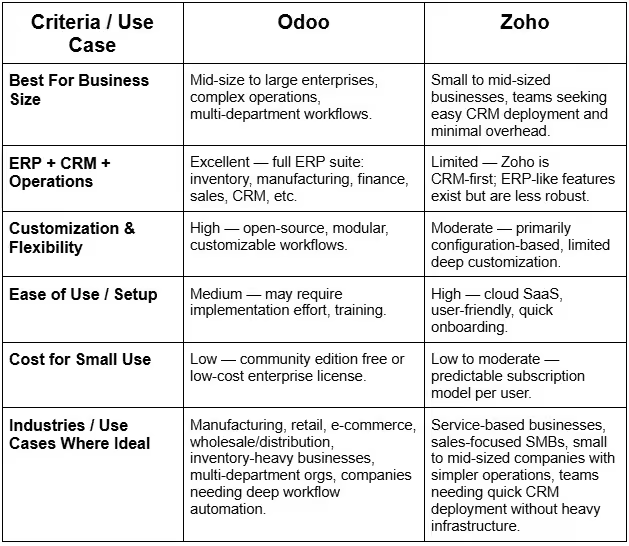
How WhizzBridge Can Help You Choose Between Odoo and Zoho
At WhizzBridge, we understand that mid-size to large enterprises often struggle with ERP/CRM selection because every business has unique workflows, legacy systems, and future growth plans. That’s why we offer expert consulting and implementation services for both Odoo and Zoho.
- If you opt for Odoo, we can help with scoping, module selection, custom development, integrations, data migration, and deployment. This ensures your Odoo ERP/CRM setup aligns with your organizational structure and industry needs.
>> Explore more here: Odoo ERP Solutions
- If your preference is Zoho, we guide you through onboarding, customization within Zoho suite, user training, and integration with existing tools.
>> Discover more here: Zoho Professional Services
Whether you need a quick CRM rollout or a multi-module ERP implementation with custom workflows, we design and implement the solution that fits your business without wasting any of your resources.
FAQs
1. Is Odoo CRM free?
Yes. The “Community” edition of Odoo is open source and free. You can use CRM (or other modules) without licensing cost.
2. Is Zoho fully cloud-based or can it be self-hosted?
Zoho CRM is fully cloud-based (SaaS). There is no option for on-premise hosting.
3. Which one is better for a manufacturing company?
Odoo, because of its robust inventory, warehouse, manufacturing, BOM, and accounting modules. Zoho lacks deep manufacturing/ERP modules.
4. Which one is better for a pure sales / service business with no inventory?
Zoho, its CRM, sales automation, marketing and service modules are well-suited for sales/service businesses without complex inventory or production needs.
5. How scalable are Odoo and Zoho for large enterprises?
Odoo is very scalable: you can grow from CRM only to full ERP, adding modules as needed. Zoho is scalable within SaaS limits, but because of per-user licensing and module costs, scaling may become costly and less flexible.
6. Does Zoho support accounting and inventory management like Odoo?
Zoho offers modules (in its broader suite) for accounting, inventory, etc., but these are less robust than Odoo’s ERP-grade features, especially for complex operations.
7. Which platform is easier to implement and adopt quickly?
Zoho is easier and faster to deploy, as it is cloud-based and does not require heavy customization or infrastructure. Odoo, while powerful, may require implementation effort, planning, and potentially developers/consultants, especially for complex setups.
8. How does customization compare between Odoo and Zoho?
Odoo offers deep customization, including custom modules, workflows, integrations, code-level modifications. Zoho offers customization via configuration (fields, workflows, automation) but is less flexible than Odoo, limiting deep, industry-specific custom logic.
9. Which option is more cost-effective for a growing company?
If growth involves adding departments, inventory, manufacturing, or diversifying operations, Odoo tends to be more cost-effective long-term due to modular pricing and flexibility. If you only need CRM and sales-focused operations, Zoho may be more cost-effective initially because of predictable subscription costs and minimal overhead.
10. Can a business migrate from Zoho to Odoo later if needed?
Yes, many businesses start with Zoho (for CRM) and later migrate to Odoo when they need ERP-level features, deeper customization, or unified business operations. However, migration needs planning: data mapping, module selection, and possibly custom development to match workflows.
.svg)


.svg)
Subscribe To Our Newsletter
Be the first to know about our newest projects, special offers, and upcoming events. Let’s build the future together!



.jpg)
.jpg)